• • •
›››
🛡 USPTO Patent Pending · Threshold-Driven Group Coordination
42 games this season · Silver Spring Ultimate

Breathe LIFE
into your EVENT!

Set a Goal for how many people it takes to make your game or event happen. SMSGO invites everyone by text or email, tracks every YES, NO, or STATUS check, then sends an "It's ON!" the moment your goal is reached — all automatically.

Almost enough Yeses with only a few hours to go? Send a NUDGE message to everyone who hasn't replied and watch almost flip to "It's ON!"

Need a limit or cap? Turn on an automatic waitlist so a full event fills the next spot for you and manages cancels.

No app. No sign-ups. No noise.
Only: is the event ON?

$5 gets you 166 texts at $0.03 each
No subscription, ever — pay as you go.
SMSGO branded banner with circuit traces and arrows
SMSGO mark
SMSGO.org
Verified | Patent Pending | Secure
+1 (240) 786-1112
Text Message · SMS/MMS
Friday · 6:42 AM
Who can play pickup at 5:30pm? Reply YES, YES + #, or STATUS to see who's in!
We need 8 for Game On!
YES
Thanks! You are counted now! Reply NO to cancel your Yes.
We're at 3 of 8 now.
STATUS
Game count: 4 / 8.
Confirmed: Name 1, Name 2, 3rd Name, Name Another
3:30 PM · Still below threshold
🔔 NUDGE: 7 of 8 confirmed. We ONLY need 1 more for Game to be called! Come on, who's in?!
🥏 GAME IS ON! 8 confirmed! See you at 5:30pm! 🥏
🥏 🔔 🥏 🔔 🥏 🔔 🥏 🔔 🔔 🔔 🥏 🥏 🥏 🔔 🥏
Watch a real Friday game confirm itself.
Toggle RCS / SMS — SMSGO speaks both.
One engine · Four ways to run your group

🎯 Threshold Events

Auto-confirms the moment enough people say YES.

📢 Broadcasts

Message anyone — individuals, groups, or teams.

📊 Polls

Ask one question. Watch the votes land live.

📍 Best Fit Time and Place

Members rank days, times & places. The engine finds the winner.

The Messaging Hub

Communicate and get replies — SMS and email together.

Broadcast to your whole group or exactly the right slice of it, see every reply in one organizer inbox, and track every dollar: you see the cost before you send, and every message itemized after.

Choose who. Write it. Send now — or on a schedule.

Pick your audience in a tap: everyone, specific groups, teams, or hand-picked members. Tap group pills to include exactly the right people — your regulars, the parents, the volunteers.

Write your message easily — add emoji, personalize with each member’s first name — then choose: Send Now, Schedule for Later at any date and time, or make it Recurring (daily, weekly, or monthly on the dates you pick).

And the price is right there before you send: live character, segment, and recipient counts with the exact estimated cost. No surprises, ever.

SMSGO Compose: tap group pills to choose your audience, with live cost shown SMSGO Compose: send now, schedule for later, or set a recurring message

Every reply comes to you — not to everyone.

Anyone on your list can simply reply to your text or email — and that reply comes back to you, the organizer, in a clean threaded inbox. Your members are never dragged into a group chat.

Respond one-on-one with a tap. Each conversation shows the message they were replying to, so you always have context. Routine YES/NO replies are filtered out automatically — your inbox shows only what actually needs you.

And in the spirit of full transparency, each reply shows its exact cost right in the thread.

SMSGO Inbox: member replies thread to the organizer, with one-tap responses

Every message you’ve ever sent. Every penny it cost.

Sent History is your complete record: every broadcast, invitation, and reminder you’ve sent — grouped by campaign, with recipient counts and delivery status.

Each send is labeled SMS or Email and shows its exact cost, down to the $0.003 email. Totals at the top tell you your spend at a glance.

Nothing hidden in credit bundles. Nothing to reconcile. The money is easy to see and track — so you always know the cost of everything.

SMSGO Sent History: every campaign with per-message costs, SMS or email
TRUE STORY

Our beloved Friday Ultimate Frisbee games were dead for years. SMSGO resurrected them, and now we play almost every week!

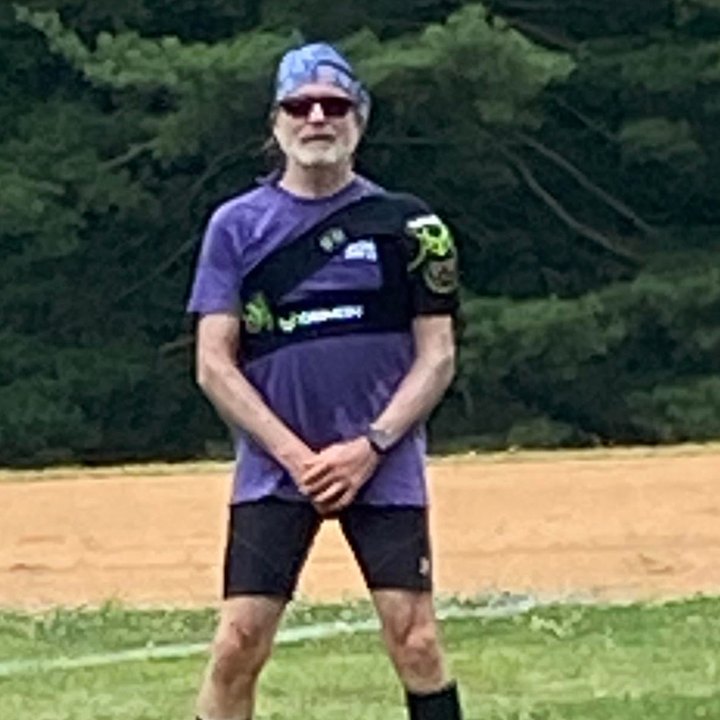
Jonathon Lunardi holding an Ultimate disc
I texted everyone: Can you play tonight? Then ... Game on!
Jon Lunardi Founder, SMSGO
Nick Kruse
The perfect tool for an epic board game night. I'll never go back.
Nick Kruse Board Game Night Organizer
Wes Long on the field
It saved the game. How many other groups need this?
Wes Long Commissioner emeritus, Silver Spring Ultimate
Jessie Glickenstein
I just text YES and the rest happens.
Jessie Glickenstein Silver Spring Ultimate Player
Mark
I'd drifted from the game. Now I'm there every week.
Mark Richardson Frisbee Game Regular
›››
How the threshold works

Set a number.
The event confirms itself.

This is the patented mechanic at the heart of SMSGO. You decide how many people it takes — one number for the whole event, or one per team. The engine runs the rest of the loop:

Invite Count Nudge It's ON!

Members reply from their regular texting app or inbox — it works on every phone made in the last 20 years, and on watches.

01 / THRESHOLD

The moment you hit your number, the call goes out.

SMSGO tracks every YES in real time. When the count reaches your threshold, your custom confirmation message fires automatically — to everyone, to confirmed players only, or to whoever you choose.

THRESHOLD REACHED MESSAGE "Game IS ON tonight. Park XYZ at 5:30pm. See you there!"
— or whatever your event needs to say.
02 / NUDGE

Auto-reminders — only if you're below.

SMSGO watches the clock. If you're under threshold as the event approaches, it reminds the people who haven't answered yet. No manual chasing. No nagging by hand. And if you're already over? Silence.

SAMPLE AUTO NUDGE "Hey, last call for tonight at 5:30. We only need 1 more YES. Who's in?"
03 / STATUS

Anyone can text STATUS and see who's in.

Members never have to ask you "is it on?" They text STATUS and get the live count plus the names of everyone confirmed — by team, if it's a teams event. No group chat. No wondering. No checking back.

SOMEONE TYPES STATUS "Game count: 4 / 8. Confirmed: Dude 1, Dudette + 1, Dude 2."
04 / PAY

Anyone can text PAY to chip in.

The cost doesn't have to fall on one person. A member texts PAY, gets a secure Stripe link, contributes any amount, and their money lands in the group wallet that powers everything. Receipt by text.

RECEIPT TO CONTRIBUTOR "Thanks! $5 added to the group wallet. You rock!"
05 / WAVES

Invite your core first. Wave 2 waits.

Send Wave 1 to your reliable regulars. Wave 2 only fires if you're still below your goal — saving money and sparing your occasional members from texts they don't need. Patent pending.

06 / WAITLIST

Full event? The line manages itself.

Cap the headcount. Extra YESes queue up in order, and if someone cancels, the next in line is promoted and notified automatically. No spreadsheet, no juggling.

07 / GROUPS

Groups & teams. Invite exactly who you mean.

Organize your roster into groups — regulars, subs, the evening crew — and teams. Message everyone, one group, or one person. Your call, per event.

‹‹‹
⭐ New · Two-sided events

Two sides. Two counts. One game.

Playing Dark vs Light? Shirts vs skins? With Teams, every side gets its own minimum. The event confirms itself only when both teams fill — never lopsided, never one side standing around.

Players pick their side right from the text — or you assign teams yourself from the roster. Your choice, per event. And when anyone texts STATUS, they see the whole board: live team rosters, by name, from any phone.

  • Per-team thresholds — fires only when every side is full
  • Self-select or organizer-assigned, chosen per event
  • STATUS shows who's in, team by team
  • Message one team, both, or everyone
SMSGO.org ✓ Teams Event
🥏 Ultimate tonight at 5:30! Reply YES to play. Dark needs 7, Light needs 8.
YES
Great! Reply 1 for Dark Shirts, 2 for Light Shirts.
1
🔵 You're on Dark Shirts — counted! Type NO to cancel · Type STATUS anytime
STATUS
🔵 Dark Shirts: 6 of 7
You, Mike, Sarah, Danny, Alex, Chris
⚪ Light Shirts: 8 of 8 ✓ FULL
Wes, Jessie, Mark, Ryan, Andrew, Nick, Jon, Thoreau
Need 1 more on Dark to make it a game!
Watch a player join a side — then check the board.
• • •
Beyond threshold events

Three more tools,
same zero-friction replies.

Every tool works the same way for your members: a message arrives, they reply from their texting app or inbox, and the engine organizes the answers for you.

📢

Broadcasts

Message anyone — one member, a group, a team, or the whole roster. Preview recipients, cost, and the final text before you hit send. Field moved? Start time slipped? Everyone knows in seconds.

"Heads up — tonight's game moved to Field 2. Same time."
📊

Polls

Ask one question. Members reply with a letter, and you watch the live tally fill in. Perfect for "which night?", "which field?", or "who's bringing snacks?"

"Which night next week? A. Tuesday · B. Wednesday · C. Thursday"
→ Wednesday wins, 12 votes.
📍

Best Fit Time and Place

The advanced planner. Members rank candidate days, time blocks, and locations — and share how far they'll travel. The engine surfaces the single best time and place for the most people. Patent pending.

"Rank your Saturdays + pick your fields" →
Best fit: Sat 10 AM · Nolte Park · 14 can make it.
‹‹‹
• • • •
ONLY
$5
to try
The $5 pilot

Just try it. By the second invite, you'll know.

$5 buys about 166 text segments — enough to run a medium-sized weekly group for around two weeks. That's long enough to see whether the threshold changes how your members commit. If it works the way it works for our Frisbee group, you'll wonder how you ran without it. If not, you're out a coffee.

$0.03 per text after that · No subscription · No auto-renewal
‹‹‹
For organizers

The web side. Built for the person running the group.

Members never leave their text app. You get a real interface — a dashboard, event pages, polls, planners — to set things up, watch what's happening, and act when needed. Here's a tour.

SMSGO organizer dashboard
Event detail page — live counts and threshold tracking
Event detail — SMS cost breakdown and notes
Poll results — live tallies of member responses
Best Fit results — availability heat map and geographic summary
01 / DASHBOARD

Your group, at a glance.

Everything at once — members, running balance, messages sent, current events with live confirmation counts.

  • Live wallet balance and total spend
  • Current events with progress bars
  • JOIN code displayed for member self-enrollment
  • One-tap access to active polls and archived events
02 / EVENT — LIVE STATUS

Watch the count climb in real time.

Every event has its own page: headcount, confirmations, no-responses, and your threshold side by side.

  • Confirmed, can't-attend, and no-response columns
  • Per-member status and message history
  • Send a manual nudge or invite more members in one click
  • Auto-nudge timing visible — you always know what's queued
03 / EVENT — COSTS & NOTES

Every text. Every dollar.

Scroll down on any event and see exactly what it cost — invitations, replies, nudges, all itemized. Add private notes for next time.

  • Itemized cost breakdown per event
  • Free-text notes for attendance, weather, venue feedback
  • One-tap archive when the event is done
  • No hidden fees, no surprises
04 / POLLS

Quick decisions, by text.

Send a poll, watch the live tally fill in, and click any name to message that voter directly.

  • Multi-option voting via single-letter reply
  • Live response rate and leading option highlighted
  • Per-voter messaging in one click
  • Nudge non-responders in a single tap
05 / BEST FIT TIME AND PLACE

Plan smarter. The big one.

Send candidate days, time blocks, and locations. Members rank everything by text, and the engine surfaces the best date, time, and place based on real availability.

  • Multi-day, multi-time-block, multi-location ranking
  • Availability heat map — see when the most people can come
  • Geographic summary — travel willingness, zip codes
  • Nudge non-responders in a single tap

Auto-advancing every 6 seconds. Hover to pause · Click a tab to jump

›››
• • • •
The story

It started with a pickup game
that kept not happening.

For years we loved our Wednesday and Friday pickup Ultimate. It died after the winter of 2023 and couldn't be resurrected. The problem: nobody was on the same platform. Some were on Facebook, some wanted email, some used GroupMe. Nobody could commit, because nobody knew if anyone else would.

"Will there be a game tonight or no? How the heck would I know. And since I am the 'coordinator' I show up anyway. When other people show up and a game doesn't make, well those people may not show up next time. What a mess when all we want to do is have some fun."

— Wes Long, Commissioner emeritus, Silver Spring Ultimate

I'm a developer, so I built something. Not because I wanted to start a company — because I was tired of watching a good group of people drift apart over something as solvable as knowing whether enough people wanted to play.

The idea was simple. Everyone already uses text messaging. So I sent one mass text to sixty-plus people with a clear rule: if enough of you say YES, the game is officially ON. When we hit the number, everyone got the announcement — and everyone showed up with confidence.

Silver Spring Ultimate has played 42 games this season — a game on the calendar every single week since March. Same group. Same field. Just a lot less friction. The organizers I built it for are running their own groups too — board game nights, soccer pickup, and more. The $5 pilot is how you find out if it works for yours.

Jonathon Lunardi
Founder · SMSGO LLC
Built SMSGO after his Silver Spring Frisbee group went dark for three years. The game came back — and the system that brought it back now serves organizers everywhere. Watch the video to see the engine in action and hear his story.
›››
• • •
From the people who use it

Members and organizers,
in their own words.

"Before SMSGO, I went six months without making it to a single game that reached our 8-player threshold. Now we have a game almost every Wednesday and Friday — it's just that easy."
Jessie Glickenstein Jessie Glickenstein
Frisbee player, Silver Spring
"Board game night was always touch-and-go. Half the group would flake last-minute and we'd cancel after I'd already set up. Now we know by 4pm whether we have enough people."
Nick Kruse Nick Kruse
Board Game Night organizer, Silver Spring
"I'm more confident the game will occur, and more likely to commit early to encourage others to play."
Mark Mark Richardson
Frisbee player, Silver Spring
"None of those platforms were as seamless or as easy as Jonathon's text bot."
AC
Alex Cronin
Frisbee player
‹‹‹
No surprises

Every text. Every dollar. Visible.

Most SMS tools hide the math behind subscriptions and "credits." SMSGO doesn't. You see the cost of every message before you send it, and the breakdown of every dollar after.

  • Every message logged with cost, segments, and channel
  • Live cost preview before you hit send — recipients, segments, total
  • Members can chip in by texting PAY — see who contributed and when
  • Group goes quiet? You pay nothing. The wallet waits patiently.
  • Cancel anytime — there's nothing to cancel. Just stop using it.
Billing & Usage · My Ultimate Frisbee Group
Live
$0.00
Current Balance
0
Messages Sent
$0.00
Member Chip-ins
Cost breakdown by type
Invitations
$3.36
It's ON! alerts
$2.52
STATUS replies
$2.04
YES responses
$1.59
Nudges
$0.36
Latest activity
Friday Game · Emily STATUS reply
−$0.03
Friday Game · 28 members It's ON! broadcast
−$0.84
Sarah texted PAY Chip-in to group wallet
+$5.00
‹‹‹
• • •
Who it's for

Any group that gathers regularly
and needs a count.

If you've ever sent "is everyone still coming?" to a group chat and waited anxiously for replies, SMSGO was built for you.

Event types:
🥏

Pickup sports

Ultimate, basketball, soccer, pickleball, volleyball — anything where headcount decides whether you play.

♟️

Board game & social nights

Game nights, trivia crews, poker, D&D campaigns — groups that need a quorum.

🎵

Music & creative jams

Song circles, open mics, jam sessions — the right players, at the right time.

🏃

Run & fitness clubs

Morning run crews, hiking groups, cycling clubs — confirm a quorum before driving to the trailhead.

Faith & community groups

Bible studies, small groups, volunteer teams — communities where showing up matters.

📚

Book clubs & cohorts

Reading groups, language meetups, knitting circles — any recurring group that lives by attendance.

›››

The $5 pilot,
in detail.

$5 = about 166 text segments. Enough for most groups to run for weeks. No subscription, no auto-renewal, no commitment. Just a wallet that loads when you load it.

First time
$5
$0.03 per text · $0.003 per email. No monthly fee. Ever.
10–15 person group Weekly events for ~3 weeks
20–30 person group Weekly events for ~2 weeks
40–60 person group Weekly events for ~1 week
Start your group →

📱 SMS Program Information

What is SMSGO?

An SMS coordination platform. When enrolled in a group, members receive event invitations, RSVP confirmations, status notifications, and group messages from their organizer.

How to Opt In

You always enroll yourself: text JOIN plus your group's code to the SMSGO number, or use your group's join link. Organizers share the link or a QR code — you enter your own number. Consent is never a condition of participation.

How to Opt Out

  • Reply STOP — all messages
  • Reply LEAVE — leave group
  • Reply UNSUBSCRIBE — all messages

Need Help?

Reply HELP to any SMSGO message | Msg & data rates may apply.

Ready to activate your group?

Only $5 — gets you 166 texts. No subscription. Try it out.

Sign Up →