SMSGO is group texting you control, over text and email. Replies come only to you, or co-admins you delegate. Run it with simple text commands, email commands, or full controls in your browser, and you see the cost before anything goes out. Members just reply from their own phone or inbox.
Get everyone in, write once, and reach each person by text or email, whichever they chose. Send from the web, or from your phone or your email when you’re on the go. You will know what it costs before it goes.
FREE CONCIERGE SETUP
Send us your list. We’ll add everyone for you.
Whatever you have, a spreadsheet, a CSV, an old roster, an email full of names and numbers, send it over. We import it into your SMSGO account at no charge, so your group is ready on day one.
1
Start with $5Create your account and fund your wallet.
2
Send us your listAny format you already have.
3
We add everyoneFree, done for you, ready to send.
roster.xlsx
NamePhoneEmail
Jessie R.(301) 555-0142—
Mark G.(240) 555-0187mark@…
Whitney P.—whit@…
Dave L.(202) 555-0119—
+ 71 more…
we import it
✓75 members added
Everyone 75Regulars 22Subs 31
Ready to send in your dashboard
Prefer to do it yourself? Members can join on their own, too.
JOIN SSUJoin by text
Members text JOIN plus your group code to the SMSGO number, then reply with their name. Done.
LINK + QRJoin link & QR code
Every group gets a link and QR code to text, post, or print. People enter their own number.
#ADDAdd from your phone
Text #ADD 2025551234 Jane to the group number, or use an email address instead of a number. Works from your email too.
RECRUITERLet a helper add people
Make a trusted member a Recruiter and they can #ADD contacts by text or email. Add only, nothing else.
YOUR GROUP, FRONT AND CENTER
Your group’s own Join and Contribute pages.
Upload your logo and a banner photo, pick your colors, write a short description, and choose your short code. SMSGO uses them to customize your group’s Join page and its Contribute page, so members see your group first and SMSGO quietly underneath.
Join page: new people enter their own number to join, under your banner and logo. Share it as a link or QR code
Short code, like SSU: people can also join by texting JOIN SSU to 240-786-1112
Contribute page: where members land after texting PAY, DONATE or CONTRIBUTE, in your colors
ABOUT: members text it to get your description back
BRAND KIT
LogoSSU
Banner🥏
Colors
Short codeSSU
DescriptionPickup Ultimate, Wednesdays and Fridays. All levels welcome.
🥏
SSU
JOIN THIS GROUPSilver Spring Ultimate
Your mobile number
JOIN →
or text JOIN SSU to 240-786-1112
🥏
SSU
SUPPORT THIS GROUPSilver Spring Ultimate
$5$10$20
CONTINUE WITH $10 →
Full amount goes to the group’s wallet
COMPOSE
Write it once. Send it to exactly the right people.
The web composer handles the everyday announcement and the big one. Pick who gets it, write it, add what it needs, and send it now, later, or on repeat.
Everyone, groups, teams, or hand-picked people, with everyone counted once even if they are in two groups
Text or email, person by person: each member gets it the way they chose, and the cost line shows the split
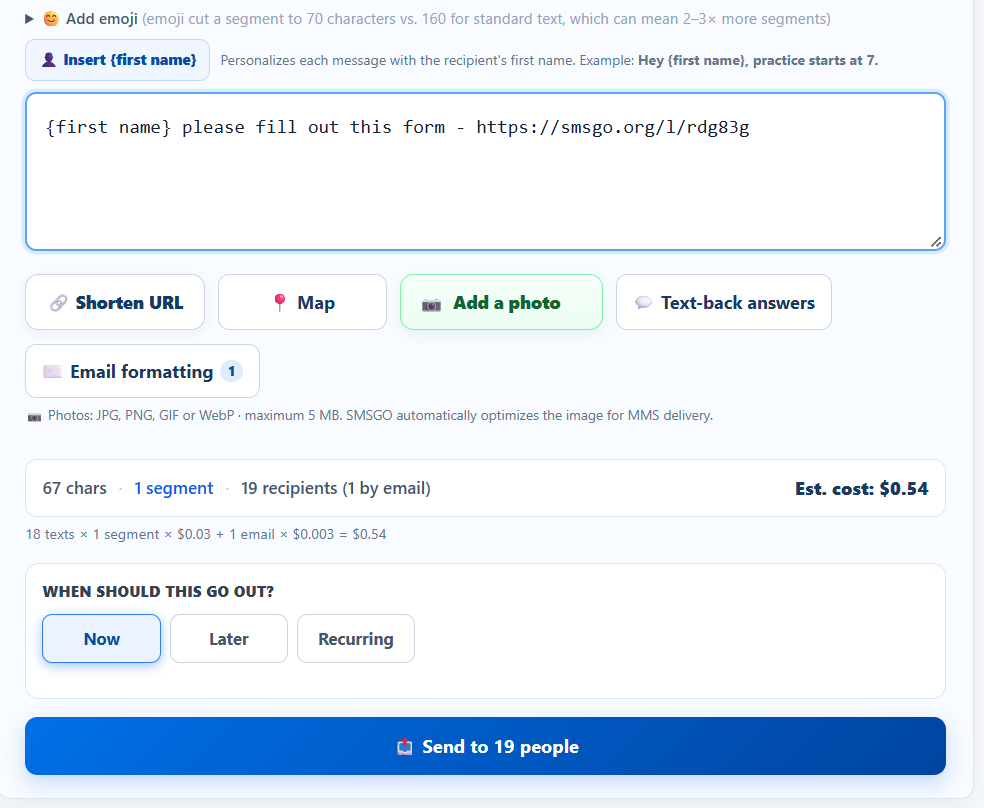
{first name} personalizes every message
Add a photo, a GIF or a voice clip: it arrives as a real picture text
Map: drop in a place and members get one-tap directions
Shorten URL: long links become short smsgo.org links with click tracking
Now, Later, or Recurring: daily, weekly, or chosen days each month
✏️ Compose💬 Inbox📤 Sent📅 Scheduled
WHO SHOULD GET THIS?
EveryoneGroupsTeamsIndividuals
Regulars 22Subs 31
Hey {first name}, game Saturday at 10 at Neato Park. Directions: smsgo.org/l/7kq2mx
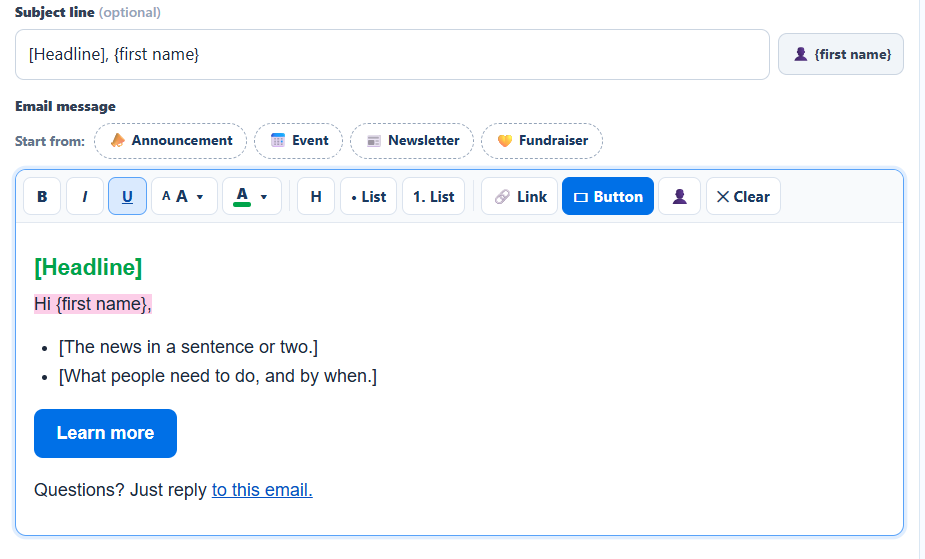
Some people live in their inbox. When your audience includes email members, Compose opens Email formatting: the same message, styled like a newsletter, in your group’s colors. Text members still get the text.
Your own subject line, with {first name} if you like
Bold, italic, underline, headings, bullet and numbered lists
Text size from Small to Huge, plus text color and highlight
Buttons like “RSVP now” or “Give now” in your brand color
Your photo at the top, and links tracked on your Links page
Preview as desktop, phone, or plain text, and send yourself a test
Still just $0.003 per email
SubjectYou’re invited: Fall Kickoff, {first name}
📣 Announcement📅 Event📰 Newsletter💛 Fundraiser
BIUAA▾A▾H• List🔗▭ Button
SSUSilver Spring Ultimate
You’re invited: Fall Kickoff, Jessie
Big news! Our fall kickoff is this Saturday.
When: Sat 10 AM
Where: Neato Park, Field 2
RSVP now
ON THE GO · FROM YOUR PHONE
Run the whole group from your own cell.
No laptop, no login. Text a command to 240-786-1112 from the phone number on your account. Group sends show you the count and the cost, and wait for your YES.
#all Practice moved to Field 2 tonight. Same time!
Send to 77 people? Est $2.31. Reply YES to send.
YES
✓ Sent to 77.
ON THE GO · FROM YOUR EMAIL NEW
Or run it from your email.
Same commands, sent from the email address on your account. Put the command in the subject line, or on its own line in the message. SMSGO answers you by email, and a group send still shows the recipients and cost first and waits for your YES.
#all MessageMessage your whole list
#Group Name MessageMessage one group
@Name MessageMessage one person, by text or email, whichever they chose
YESCANCELSend or discard a pending group message
12Pick the right person when a name matches more than one
#ADD 2025551234 First LastAdd a phone contact, when instant-add is on
#LIST#MEMBERS Group NameYour member and group counts
MUTEUNMUTEPause or resume member-reply alerts to your email
HELPMENUGet the full list by email
“Re:” and “Fwd:” are ignored, and so is quoted reply history, so you can just hit Reply. Got a member’s reply forwarded to your email? Reply to it and your answer reaches them as a text.
Only you can run commands. SMSGO accepts them only from the email on your account, and checks every one before acting. A Recruiter can only #ADD.
Inbox · Silver Spring Ultimate
Me
To: SMSGOSubject: #all Practice moved to Field 2 tonight. Same time!
SMSGO: BROADCAST — Silver Spring UltimateSend to 77 people? Est $2.31. Reply YES to send, or CANCEL.
Me
Re: SMSGO: BROADCASTYES
SMSGO: YES — Silver Spring Ultimate✓ Sent to 77: 71 by text, 6 by email.
THE PART WE’RE PROUDEST OF
You always know what a message costs before you send it.
No credits, no bundles, no math homework. SMSGO counts the characters, the segments, and the text/email split as you type, and shows the dollar amount right under your message. If it would cost more than you meant, you will see it first.
TRY ITType a message, see the cost
30
20%
70 chars1 segmentStandard text
Est. cost$0.74
24 texts × 1 segment × $0.03 + 6 emails × $0.003
A segment is 160 characters.Most messages are one. Longer ones are split, and SMSGO shows the count as you type.
Emoji shrink a segment to 70.The segment count updates live, so you see the jump the moment an emoji or symbol goes in.
“Trim 3 characters to save $0.57.”When a message barely spills into another segment, you get the exact saving.
Pasted punctuation gets cleaned up.Curly quotes from Word or Docs are swapped for plain ones so they don’t double the cost.
Every event send gets a preview.Invitations, nudges, and broadcasts show recipients, text/email split, segments, and cost before you confirm.
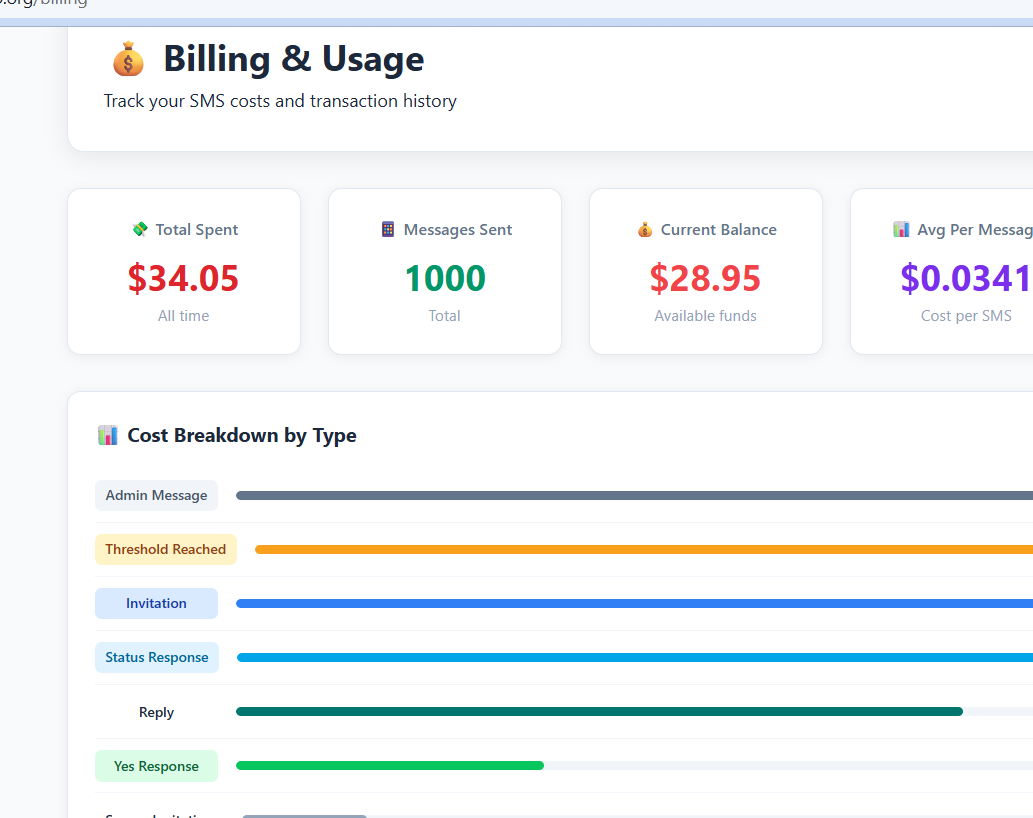
Then it’s itemized.Every message and what it cost shows in Billing & Usage.
$0.03per text segment
$0.003per email
$0.04per photo, GIF or audio text
$0with no messaging activity
2
CHAPTER 2 · REPLIES
Need people to respond?
Members just reply like normal. Their answers come to you, not to everyone, and you can answer from the web, your phone, or your email.
INBOX
Every reply comes to you. Not to the whole group.
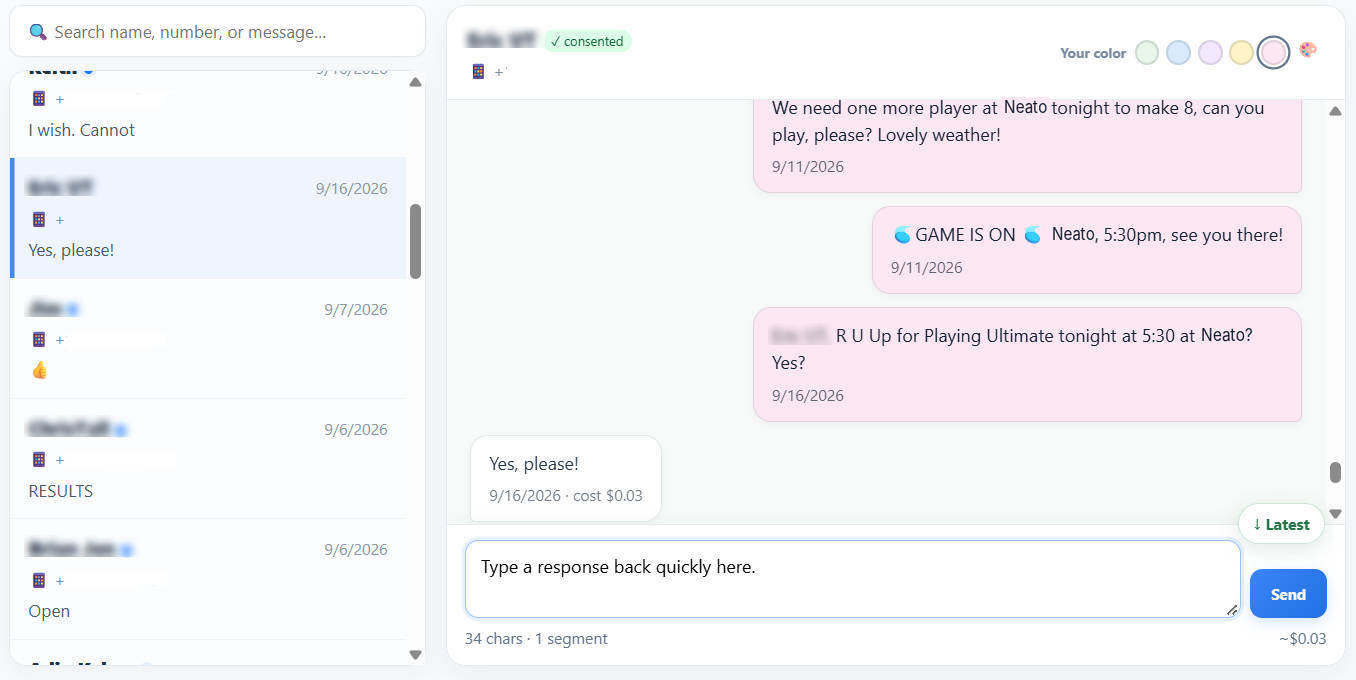
“Can I bring my daughter?” “Running 10 minutes late.” Replies land in your Inbox as clean conversation threads, with the message they were answering right there for context. No reply-all chaos, and nobody sees anyone else’s number.
One thread per person, with names and history
Routine YES/NO replies are filtered out, so the Inbox shows what needs you
Reply one-to-one in a tap
Sent History shows who got each message, and “delivered” means the carrier confirmed it
🔍 Search conversations
W
WhitneyWhere?
1d
P
Pete KGot it 👍
6d
D
Dave LI’ll be there.
6d
M
Mark GCan I bring my daughter?
9/25
Type your reply…Send
WHEREVER YOU ARE
Replies follow you. Answer however you like.
1A member texts back
Yep, I’ll be there. What field?
A normal text reply. No app, no link.
2It reaches you
✉️ Whitney replied: “What field?” Reply to this email to answer.
Forwarded to your phone, your email, or both, plus your Inbox. Busy day? MUTE pauses the alerts.
3You answer your way
Field 2! See you there.
Hit Reply in your email, text or email @Whitney, or use the Inbox. She gets it the way she chose.
TEXT-BACK ANSWERS
Answer the same question once. Forever.
Set up one-word keywords and members get an instant answer without waiting for you. Perfect for WHERE, WHEN, and PARKING.
Your own keywords, or start from WHEN, WHERE, NAME, PARKING
ABOUT is built in and sends your group description
Different answers per group, so each crew gets its own assignment
Optional start and end times, so an answer only works when it should
SMSGO.org
Verified by Google
WHERE
📍 Neato Park, Field 2. Park in the main lot. Directions: smsgo.org/l/29fbx4
PARKING
Free lot behind the rec center. Overflow on the side street.
LINKS
See how many people actually tapped your link.
Every link you shorten, in a text or an email, gets its own page in Links: a catalog of everything you have shared and how it performed.
Real taps only: link previews, bots, and your own clicks are filtered out
Click rate: unique people who tapped vs. people who received it
Daily clicks, busiest times, and phone vs. computer
Rename, pause, archive, or change where a link goes
Ask the group and let SMSGO organize the answer: a poll that tallies itself, an event that fires when enough people say YES, and a planner that finds the time and place that work.
POLLS
Ask once. Watch the answer take shape.
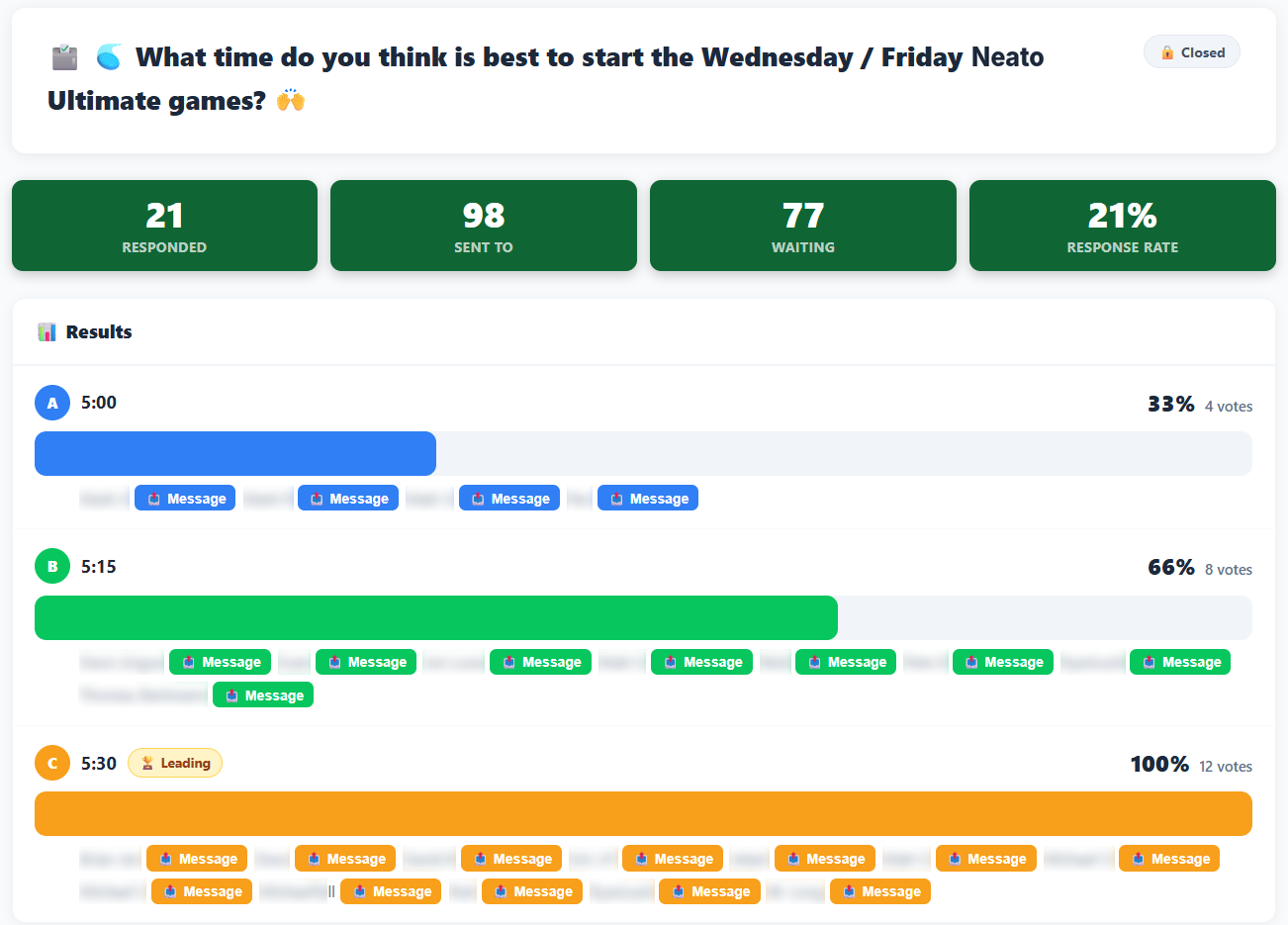
Members reply with letters in almost any format, or tap a button in the email version, and the tally fills in live.
Up to 4 questions with 2 to 8 answers each, sent to everyone or selected groups
Optional comments at the end, and a results email when the poll closes
Members text RESULTS for the latest standings, or keep results organizer-only
Click any voter to message them directly
📊 What time works best Friday?
24 responses · live results
A5:00 PM6
B5:30 PM16
C6:00 PM2
B: Emily, Keith, Goose, Ryan, Whitney, Pete +10
THE HEART OF SMSGO · USPTO PATENT PENDING
Set a Goal. When enough people say YES, it’s ON, automatically.
Ordinary RSVP tools show you the count. SMSGO can act on it. This is what SMSGO was invented for. You decide how many YESes it takes. Members reply YES, YES +1, or STATUS. The moment the count hits your Goal, your “It’s ON!” message goes out on its own.
The count climbs live as replies come in, by text or email
Your confirmation goes to everyone who said YES, the instant the Goal is hit
Late YESes still count, and join the waitlist if you set a cap
No minimum needed? Skip the Goal and simply collect RSVPs
47 of 58games in our own pickup group’s 2026 season reached their Goal and announced themselves. 442 spots filled by text, and 889 STATUS checks members ran themselves.
EVENT · FRIDAY 6:00 PM
Ultimate at Neato Park
GOAL 8
0/ 8 YES
SENT AUTOMATICALLY TO ALL 8
🥏 It’s ON! 8 confirmed. Game tonight at Neato Park, 6:00. See you there!
THE EVENT TOOLKIT
Everything that helps an event fill. Hover or tap to see how organizers use each one.
Teams
Two sides, two Goals, one event. It fires only when every team fills.
Dark needs 7, Light needs 8: each side tracked separately
Members reply 1 or 2 to pick a side, or you assign them
STATUS shows the board team by team
Nudges
Automatic reminders, only to people who haven’t answered, only if you’re short.
Pick the timing: 1, 3, or 24 hours before
Skipped automatically once you hit your Goal
Or send one by hand from the event page
Waves
Invite your regulars first. The wider bench hears only if you still need people.
Wave 1 goes to your core group right away
Wave 2 fires only if you’re below the Goal
Fewer texts sent, and fewer people bothered
Waitlist
Cap the event. When someone drops, the next person is promoted and told.
Set a hard cap for a table, field, or room
Someone texts NO and the next in line is in
They get a text: “Spot opened up, you’re in!”
STATUS
Anyone texts STATUS and gets the live count. No more “is it on?”
Live count and who’s confirmed
Team-by-team on two-sided events
Works anytime, for any event they’re invited to
Many events at once
Wednesday game, Friday game, Sunday brunch, each with its own Goal and list.
Run several events side by side
Event notes to remember what happened
Archive finished events in one tap
FIND A TIME & PLACE · PATENT PENDING
Let the group tell you when, and where.
Every scheduling poll works the same way: make a link, share it, chase people to click it. SMSGO asks the group by text and email, where they already are. It comes to them. No link to chase.
Offer candidate days, time blocks, and locations
Members rank them, and top choices can count more
Add how far people are willing to travel for a place
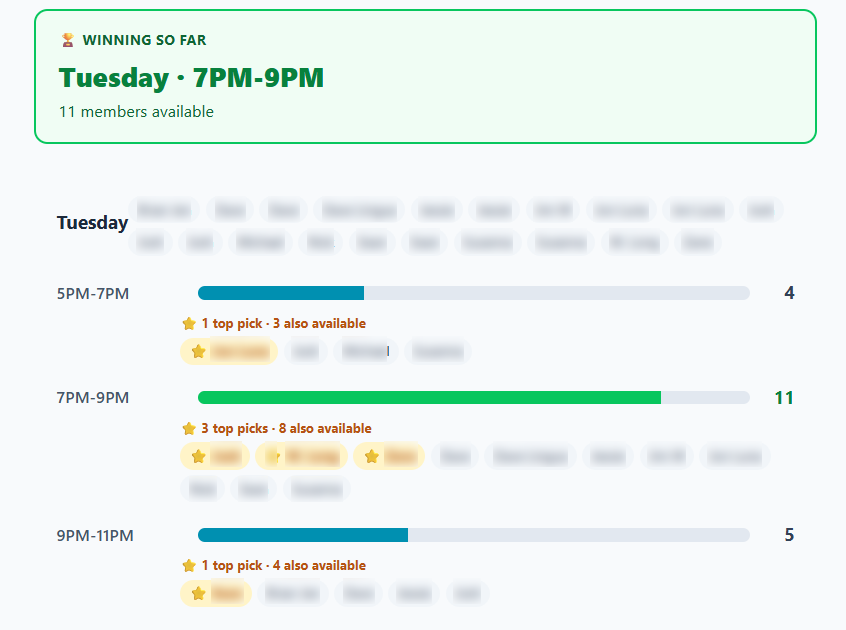
A heat map shows when the most people can make it
Availability heat map
★ Best fit: Thursday evening · 11 of 12 can make it
4
CHAPTER 4 · MONEY
Pay as you go. Let members chip in.
A prepaid wallet instead of a subscription, every cent visible, and a branded page where members can help cover the cost.
WALLET & BILLING
$5 starts your wallet.
$5 to start, about 166 standard text segments. No subscription and no auto-renewal. Top up when you want, and keep your balance until you use it.
Low-balance warnings before you run out
If the wallet can’t cover a send, it stops instead of billing you more
Billing & Usage shows every message, by type and by day
Members text PAY, DONATE, or CONTRIBUTE and get their own secure, trackable link to your contribution page: the same logo, banner photo, colors and description as your Join page. The full amount goes into your wallet, and you get a notification.
Your members should know who is texting them, and be able to leave any time. SMSGO is built for both.
VERIFIED SENDER
On AT&T and Verizon, they see SMSGO.org with a checkmark.
On supported RCS phones, members see the SMSGO.org name, logo, and a Verified by Google badge instead of an unfamiliar number. Everyone else gets a normal text.
SMSGO.org ✓Verified by Google
RCS branding depends on carrier, device, and messaging app. It improves recognition but does not guarantee delivery.
STOP means stop.Reply STOP anytime to stop texts from that number, and START to come back. LEAVE removes you from just one group. When you add someone, their first text starts with “From” and your group’s name and ends with “Reply STOP to opt out, START to opt back in.”
Registered with the carriers.Texts go through A2P 10DLC registered numbers. Email goes from an authenticated sending domain.
Numbers never sold.Member phone numbers are used only to deliver your group’s messages. Never sold, rented, or shared for marketing.
Private by design.Members never see each other’s numbers, and replies go only to you.
You decide who can send.Commands are accepted from the phone number and email on your account, and from co-admins you’ve given their own login and switches. Group sends wait for a YES.
Members never see a dashboard. They just text. Not case-sensitive.
YESCount me in. Add +1 or +2 for guests.
NOCan’t make it, or cancel a YES. Frees your spot.
1 / 2Pick your team on a two-sided event.
STATUSThe live count and who’s in.
RESULTSLatest poll results, when the organizer shares them.
PAYGet a link to chip in. DONATE and CONTRIBUTE work too.
JOIN SSUJoin a group with its code.
NAME JessChange the name the group uses for you.
ABOUTThe group’s description and how to join.
HELPInfo about the program and how to get support.
LEAVELeave one group, stay in the others.
STOPStop texts from that number.
STARTGet messages again after a STOP.
Ready to try it on your group?
$5 to start, about 166 standard text segments. Send us your list and we’ll import it for free. No subscription, no app for members, commands from your phone or email, and you see every cost before you send.