Compose with every tool.
Pick recipients, add a photo, a GIF, a voice clip, a map or a short link, format the email version, and send now, later or on repeat.

Already use SMSGO? Log in to your Messaging dashboard →
Write it once. SMSGO delivers it by text or email, each person’s choice, and replies come only to you, or co-admins you delegate.
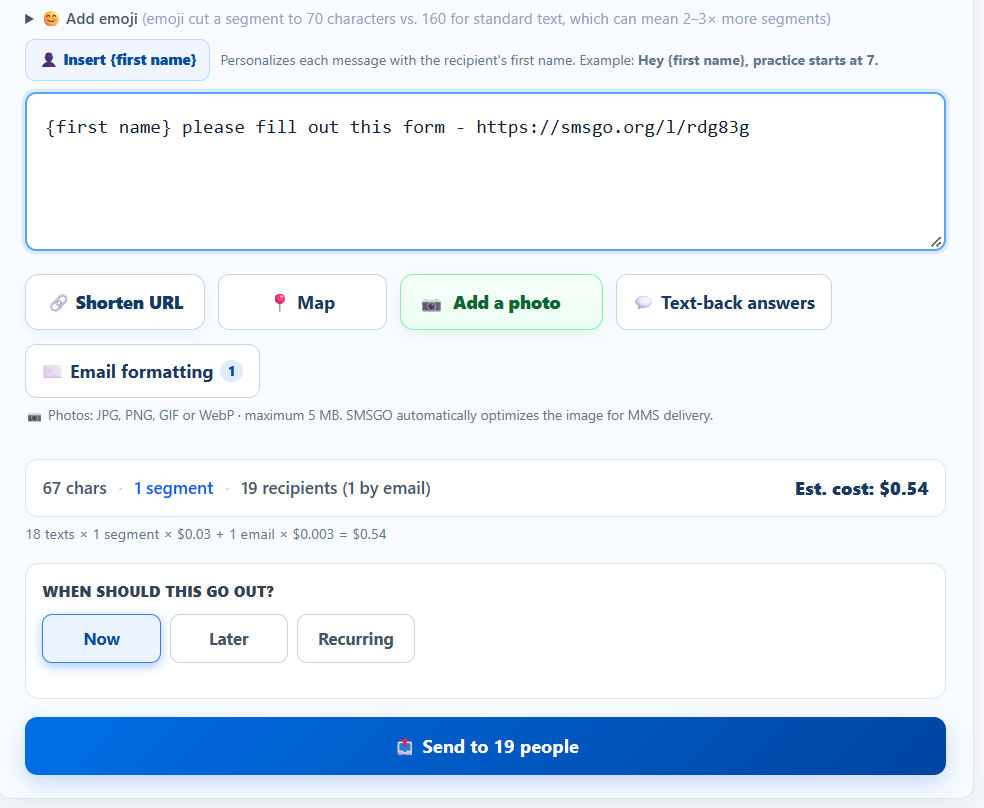
At your desk, at the field or in your inbox. Every way shows you who will get it and what it costs before anything goes out.
Pick recipients, add a photo, a GIF, a voice clip, a map or a short link, format the email version, and send now, later or on repeat.
Your normal texting app becomes the remote control. SMSGO confirms the count and cost, then sends when you reply YES.
Put the command in the subject line, from the email on your account. Same count, same cost check, same YES.
Send to everyone, to one or more groups, to a team, or to people you pick by name. Leave anyone out with one tap. And {first name} makes a group message feel personal.
Each message can carry what people need to act on it.
A flyer or a team photo, a GIF from the built-in GIPHY search, or a voice clip up to 2 minutes. One per text at $0.04. Phones that can’t play audio get a free Listen link.
Add a place and people get a tap-for-directions link.
Long links become clean smsgo.org links, and your Links page shows how many people actually tapped.
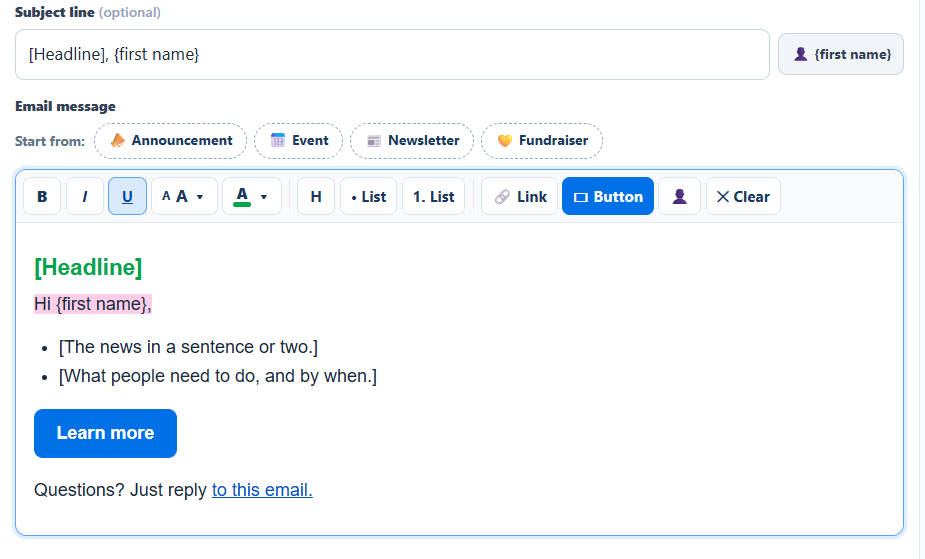
Not a text pasted into an inbox. Add a subject line, a headline, bullet points and a button, or start from a ready layout: Announcement, Event, Newsletter or Fundraiser.
No reply-all, no group chat. Every answer lands in your Inbox, and nobody sees anyone else’s number.
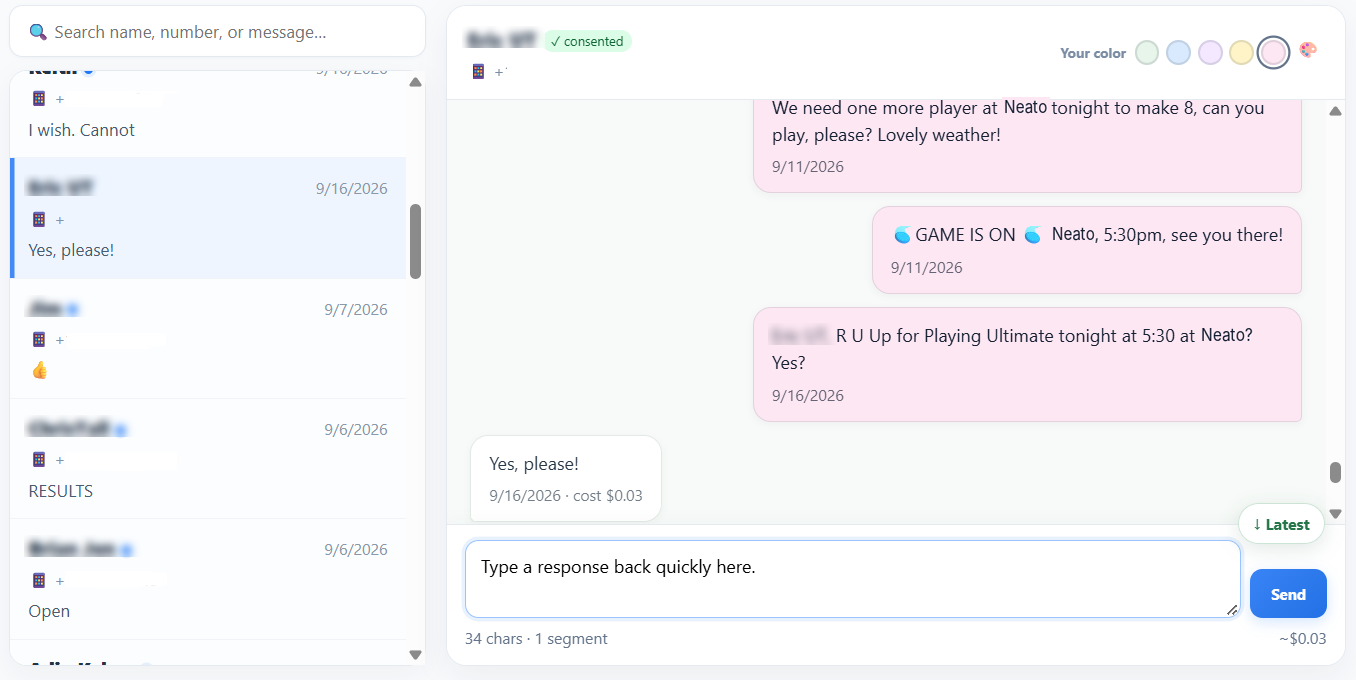
Need a head count or a quick confirmation? Turn on Ask for YES in Compose before you send.
Make your own keywords. When someone texts one, SMSGO replies instantly, even at 11 PM.
WHERELincoln Elementary, side doorPARKINGUse the church lot on ElmWIFIGuest / welcome2026SHUTTLEEvery 20 min from the hotelDifferent groups can get different answers to the same word, and answers can switch on and off on a timer.
Schedule a message for later, or make it recurring: daily, weekly, or on set days each month.
SMSGO shows the math on every message, so there are no surprises later.
Tip: emoji shorten a text segment from 160 characters to 70, which can mean 2 to 3 times more segments. SMSGO warns you before you add one.
Sent History lists everything you’ve sent, with search and filters. Open “Who got it” on any message to see each person and what their carrier reported back. A text counts as delivered only when the carrier confirms it, and SMSGO never claims a text was read.
Book fair needs 3 more volunteers Friday. Reply YES if you can help!
Schools and PTAs YOUTH GROUPYouth night 6:00 to 7:30. Bring a friend!
Churches and youth groups WEDDINGWelcome dinner moved to 7. Directions: smsgo.org/l/55
Weddings and family events AIRBNB HOSTOpen dates Oct 24 to 26, and 15% off for returning guests.
Small businessesSent History shows every message you sent. Open “Who got it” to see each person and what their carrier reported. A text counts as delivered only when the carrier confirms it. If someone had texted STOP, the charge is refunded automatically.
No. Members get a normal text or a normal email, whichever they chose, and reply the same way. There’s nothing to download and no account to make.
Yes. Each member picks text or email, and one send reaches both. Email members get a formatted email with your subject line, headline, bullets and buttons.
Only you. Replies come back privately to your Inbox, and can be forwarded to your email instantly or as a digest. Members never see each other’s numbers.
Yes. Text #all, #GroupName or @Name plus your message to 240-786-1112 from the phone on your account. SMSGO shows the count and cost, and sends when you reply YES. The same commands work by email.
Yes. Send now, pick a later time, or make it recurring: daily, weekly, or on set days of the month.
Yes. Attach a photo, an animated GIF (search GIPHY right in Compose) or a voice or audio clip up to 2 minutes. It goes out as a picture text ($0.04 per text) and appears in the formatted email for members on email.
$0.03 per text segment and $0.003 per email, with the exact estimate shown before you send. A standard text segment is up to 160 characters, or 70 if it contains an emoji.
Yes. Put {first name} in the message or the email subject, and each person sees their own name.
Send us your list and we’ll import it free. Then write once, and reach everyone by text or email.
Pay as you go · Text or email · Real support when you need it

Text and email for people on the go. Reach your group, hear back, and coordinate what happens next.
Start for $5
SMSGO helps you text and email your whole group, while keeping replies private to you and your team.
Most websites choose how you read. Here, you choose. Pick your favorite font to explore SMSGO. Your choice can follow you into your account when you sign up.
Activate your account for just $5 and get 166 text segments to start. You can change both your font and color anytime inside SMSGO.
Enjoy exploring SMSGO!