List the days and times you’re considering. SMSGO asks your group by text and email, collects everyone’s availability, and shows the best time rising to the top as answers come in. Add places, and see who can actually get to each one.
It comes to them. By text or email, no link to chase.
Days and times, from rough windows to exact blocks.
Fall tournament weekend Reply OPEN to share your availability.
OPEN
Q1: Which dates could you make it? A=Sat Oct 17 B=Sat Oct 24 C=Sat Oct 31
Reply letters separated by commas (e.g. A,B)
B,C
A couple more quick questions…
Thank you! Your responses have been recorded.Your own confirmation message
🏆 WINNING SO FAR
Sat Oct 24 · Morning14 members available
📍 Best place: Wheaton Fields · 17 can reach it
21 of 26 replied
TWO WAYS TO USE IT
Just a time, or a time and a place.
Most decisions are about when. Some are about where, too: the tournament, the retreat, the reunion weekend. Choose one when you start.
🗓️
Just a time
Offer specific dates or general weekdays, then the times to choose from. People pick what works, and the most-available slot wins.
Board and committee meetings
Practices and rehearsals
Trainings and orientations
Study groups and book clubs
📍
A time and a place
Add up to 8 candidate places. People also share their home zip code and how far they’ll travel, and SMSGO ranks each place by who can reach it.
Which tournament to enter
Where to hold the reunion
A retreat or weekend trip
A regional meetup or event
SET IT UP
A few choices, and it’s on its way.
You see a preview of exactly what members will receive before anything is sent.
Which days?2 to 8 specific dates, or the days of the week that generally work.
Which times?Rough times of day like Morning or Evening, a window SMSGO splits into 2-, 3- or 4-hour blocks, or any time at all.
Rank favorites?Optional. Ask for a top choice so you see what people want most, not just when they’re free.
Where? (optional)Up to 8 places, plus how people share travel distance: one number, or north, south, east and west.
Who gets it?Everyone, or any mix of groups, teams and individuals.
WHAT ARE YOU PLANNING?
Fall tournament weekend
WHAT ARE YOU FINDING?
🗓️ Just a time📍 A time AND a place
DATES
Sat Oct 17Sat Oct 24Sat Oct 31
TIMES
🌅 Morning☀️ Afternoon🌙 Evening
CANDIDATE PLACES
Wheaton FieldsColumbia ParkFrederick Complex
RANKING
⭐ Ask for a top time choice
WHAT MEMBERS DO
A short text conversation. Or one tap into a form.
Texters answer a few quick questions with letters and numbers. Email members tap a button and fill in the same answers on a simple page. Both land in the same results.
1
Which dates work?Q1: Which dates could you make it? A=Sat Oct 17 B=Sat Oct 24 C=Sat Oct 31B,C
2
Which times, for each date?For Sat Oct 24, which times are open for you? A=Morning B=AfternoonA,B
3
Top choice (if you asked)Which time slot is your #1 TOP choice? Reply one letter, or SAME if they all work equally.A
4
Home zip code (with places)Almost done! What’s your home zip code? (e.g. 20910)20902
5
How far they’ll drive1=up to 10mi 2=up to 20mi 3=up to 30mi 4=up to 45mi 5=60mi+ Reply one number (e.g. 3)3
Can’t make any of them? People reply SKIP and they’re out for this one, or OPEN later if plans change.
LIVE RESULTS
Watch the best time rise to the top.
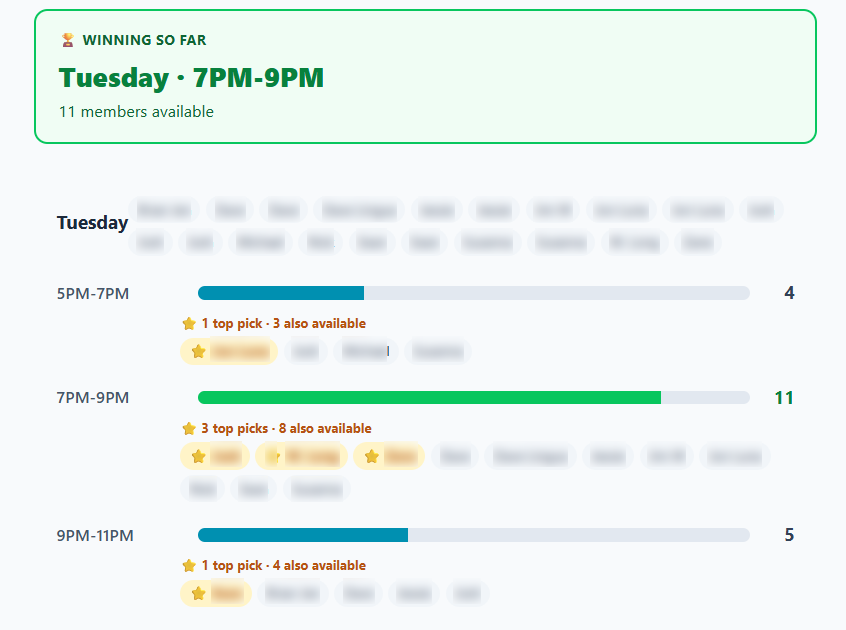
Your results page updates as replies arrive. The winning slot is highlighted, every slot shows who’s available, and gold stars mark people’s top choices.
Winning so far. The time with the most people available, front and center.
Best place. The candidate place the most people can reach.
Nudge the quiet ones. One reminder to everyone who hasn’t replied, with the cost shown first.
Message who answered. Tell the people who responded what you decided.
Real results from our group, names blurred.
FIND A PLACE
Pick the place people can actually get to.
Each person shares a home zip code and how far they’ll travel. SMSGO maps that against your candidate places and ranks them by how many people can reach each one, with the names and distances behind every count.
Simple radius. One number for how far in any direction.
Directional. Four numbers for north, south, east and west, for groups spread along a highway or a coastline.
Combined with time. See which places work on which dates, with top choices marked.
📍 Location rankings
🥇
Wheaton FieldsWheaton, MD
17 can reach
🥈
Columbia ParkColumbia, MD
12 can reach
🥉
Frederick ComplexFrederick, MD
6 can reach
Zip codes represented:20902 (5)20910 (4)20850 (3)21044 (3)+6 more
POLL OR FIND A TIME?
Use the right tool for the decision.
A pollOne question, up to 6 answers. “Tuesday, Wednesday or Thursday?” Results in a single reply.
Find a TimeMany dates, times and places. Who’s free when, what they prefer, and where they can get to.
By text, they reply OPEN and answer a few quick questions with letters, like B,C for the dates that work. By email, they tap a button and fill in the same answers on a simple page. Nobody needs an app or an account.
What days and times can I offer?
Offer 2 to 8 specific dates, or the days of the week that generally work. For times, offer rough times of day like Morning or Evening, a window that SMSGO splits into 2-, 3- or 4-hour blocks, or any time at all.
Can people tell me their favorite?
Yes. Turn on ranking and people pick their top choice, so you see what’s most wanted, not just who’s free. Email members can rank in more detail, 1-2-3.
How does finding a place work?
Add up to 8 candidate places. Each person shares a home zip code and how far they’ll drive, either one number for any direction or four numbers for north, south, east and west. SMSGO ranks the places by how many people can reach each one.
Can I see results while people are still answering?
Yes. Your results page updates as replies come in, with the winning time, the best place, who’s available for each slot and gold stars for top choices.
Can I remind people who haven’t replied?
Yes. Send one reminder to everyone who hasn’t answered, edit the wording if you like, and see the cost before it goes out.
What if someone can’t make any of the options?
They reply SKIP and they’re out for this one. If plans change, they can reply OPEN to answer later.
Can I send it to just some of my group?
Yes. Send it to everyone, or to any mix of groups, teams and individuals.
What does it cost?
Invitations are $0.03 per text segment and $0.003 per email. Answering by text is a short conversation, so each question and each texted answer is billed like a text, roughly $0.25 to $0.50 per person who answers by text, depending on how many dates and questions you include. Email members answer on a web page at no extra cost.